Signing up for the wrong delivery channel costs margin on every order, because each channel takes its cut in a different way. On their merchant pages, the large delivery apps describe two income streams, a commission the restaurant pays on each order’s subtotal and fees the customer pays at checkout, and what the restaurant keeps depends on which channel the order comes through and who delivers it.
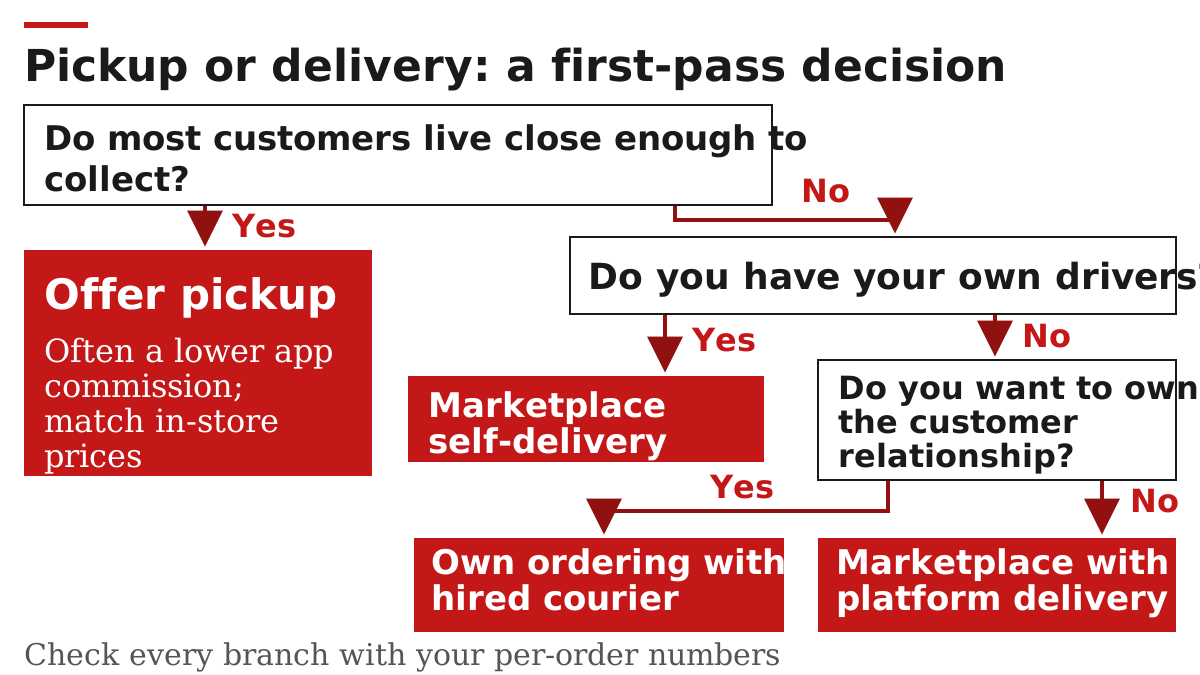
Restaurant delivery apps work in four ways: a marketplace lists your menu and its couriers deliver; a marketplace lists your menu and your own staff deliver; you take the order on your own site and pay a courier network per delivery; or the customer orders ahead and picks up. On marketplace orders DoorDash and Uber Eats both charge a percentage of the order subtotal, set by the plan you choose, and on their standard plans both charge less on pickup orders than on delivered ones (merchant pricing pages, read 7 October 2026). The customer separately pays delivery and service fees to the platform. To compare channels, write down what you keep per order on each one, then test before you commit.
This guide is written for independent restaurant and bar operators in the US who are deciding whether to list on a delivery app, or which mix of channels to keep. It explains the models, the money flow and the delivery-versus-pickup trade-off; it does not rank apps or quote fee rates, because those rates change and differ by city.
- Your own ordering channel: DoorDash’s and Uber Eats’ ordering products for your website are commission-free, but you pay payment processing and the delivery is billed separately.
- Membership customers: the higher marketplace plans buy access to members who get waived delivery fees on eligible orders.
- Next step: calculate what each order contributes on each channel, then run a short test.
What are the main types of restaurant delivery?
There are four types, and they differ on three points: who takes the order, who delivers it, and how the platform is paid. A marketplace (DoorDash, Uber Eats, Grubhub) owns the ordering app and the customer relationship; a delivery-only service carries orders you took yourself; pickup removes the delivery leg entirely.
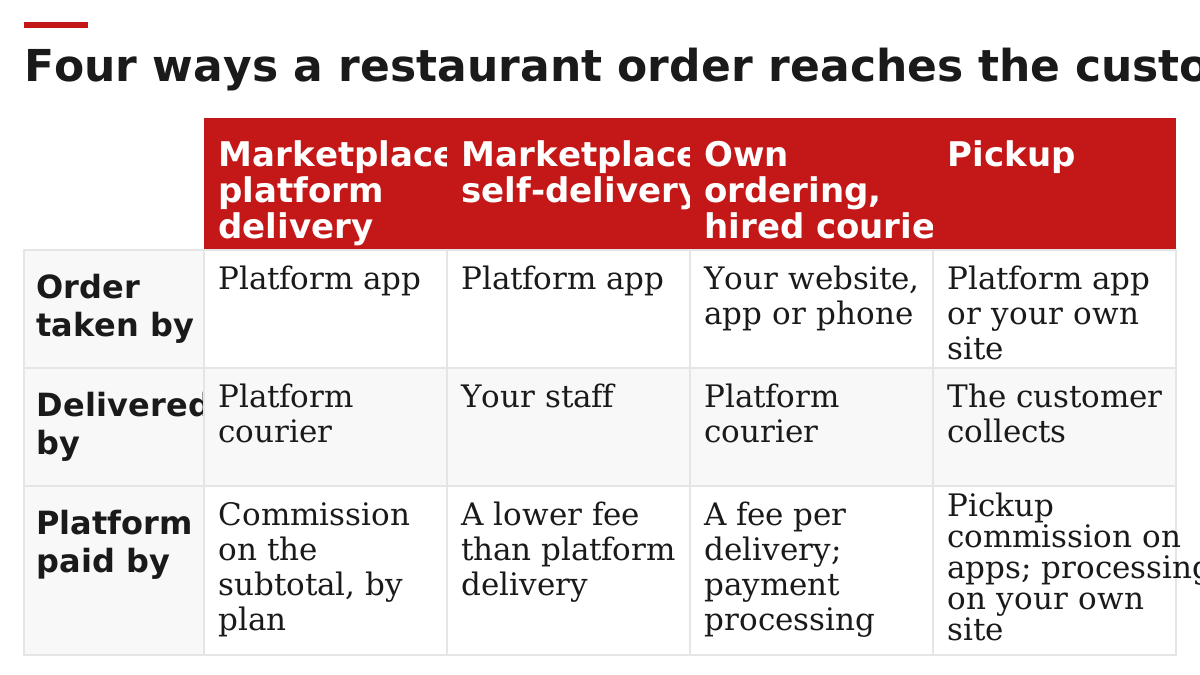
| Model | Who takes the order | Who delivers | How the platform is paid | Examples from merchant pages |
|---|---|---|---|---|
| Marketplace, platform delivery | Platform app | Platform courier | DoorDash and Uber Eats: commission on the order subtotal, by plan. Grubhub: check its merchant terms | DoorDash Marketplace, Uber Eats Marketplace, Grubhub Delivery |
| Marketplace, self-delivery | Platform app | Your staff | Uber Eats: a self-delivery fee, lower than its platform-delivery plans. Grubhub: check its merchant terms | Uber Eats self-delivery, Grubhub self-delivery |
| Own ordering, hired courier | Your website, app or phone | Platform courier | Two separate charges: the ordering product (DoorDash Online Ordering and Uber Webshop are commission-free, with payment processing) and the courier, billed per delivery (DoorDash Drive On-Demand, Uber Direct) | DoorDash Online Ordering with Drive On-Demand, Uber Webshop with Uber Direct; Grubhub Direct is a commission-free ordering site |
| Pickup | Platform app or your own site | The customer collects | App pickup: a pickup commission, lower than delivery on DoorDash’s and Uber Eats’ standard plans. Own site: depends on your ordering product | DoorDash Pickup, Uber Eats pickup, Grubhub pickup |
Grubhub also offers “supplemental delivery”, where its drivers cover addresses outside your own team’s range, and Uber Eats lets self-delivery restaurants call on its couriers for farther orders at a higher fee. You can run more than one model at once, and the rest of this guide assumes you might. Taking orders on your own site and paying a courier are separate decisions, so price them separately. More on running these channels day to day is collected under delivery operations.
Takeaway: Decide first who you want to own the customer relationship and who you want to employ as drivers; the model follows from those two choices.
How do delivery apps make money from an order?
A marketplace earns from both ends of the order. The restaurant pays a commission, a percentage of the order subtotal deducted from its payout. The customer pays platform fees on top of the food. Couriers are paid by the platform and, on DoorDash, receive all customer tips.
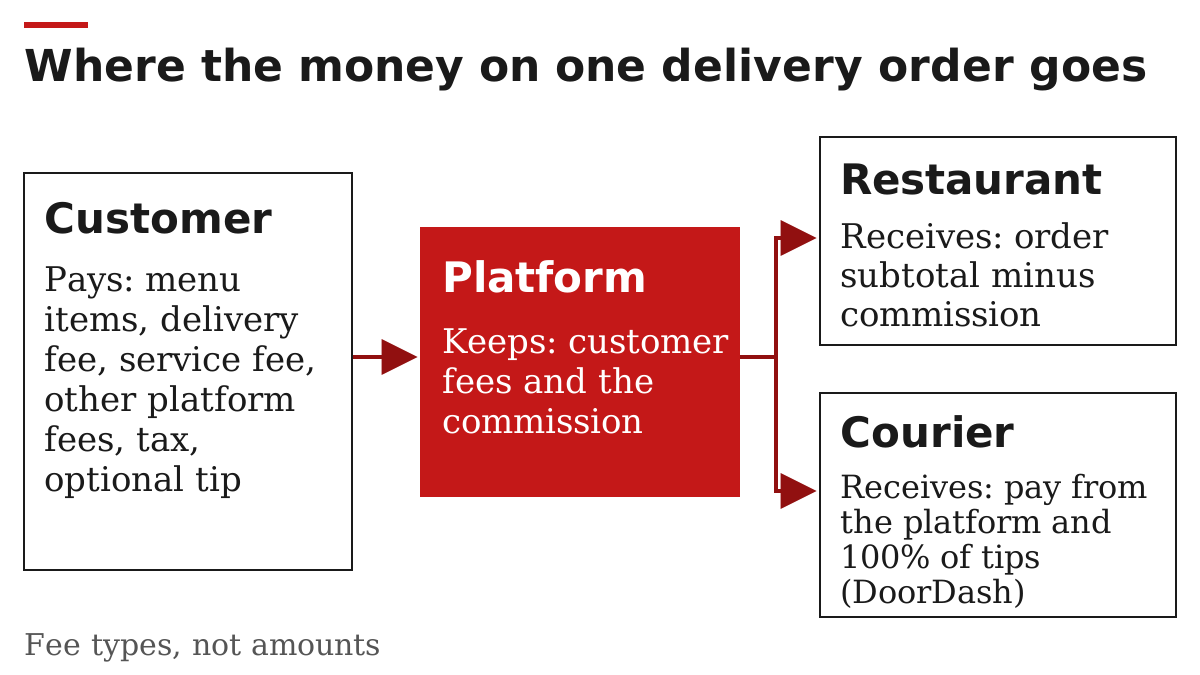
On the restaurant side, DoorDash describes the arrangement plainly: “You pay a percentage of each order’s subtotal”. It states the commission covers listing and marketing on DoorDash, Dasher logistics, customer support and credit card processing, and that there are no activation, subscription, software or cancellation fees. Extra costs appear only if you opt in, for example its tablet or paid promotions and sponsored listings. Uber Eats calls the same charge a “Marketplace Fee”, charged per plan, with a separate Pickup Fee for pickup orders.
On the customer side, DoorDash’s help centre lists the fees a customer can see on a delivery order: a service fee, a delivery fee, a long distance fee, a regulatory response fee where local rules raise its costs, a small order fee below a subtotal threshold, a weather impact fee and an optional express fee. It states that these fees go to DoorDash, that the exact fees depend on the merchant, DashPass membership and local regulations, and that Dashers receive 100% of customer tips. Uber Eats sets its customer Delivery Fee dynamically from factors such as the customer’s location, how many couriers are nearby and platform activity.
Membership programmes connect the two sides. Members of DashPass (DoorDash) and Uber One get waived delivery fees on eligible orders and other discounts; restaurants on the higher plans get access to those members. On Uber Eats, Plus-plan restaurants pay an extra percentage on Uber One orders to take part, while Premium includes it.
Common mistake: Comparing apps on the commission rate alone. The customer’s delivery fee, which the restaurant does not set, changes how many orders arrive, and both platforms sell their higher plans partly on lowering it.
Takeaway: Read every order as two bills: the commission you pay on the subtotal, and the fees your customer pays the platform.
What do the higher-priced plans buy?
According to the two companies’ US pricing pages (read 7 October 2026), a higher plan costs a higher percentage of each order and buys reach: a wider delivery area or more prominent placement, a lower delivery fee shown to customers, and access to the platform’s members. DoorDash states it charges no monthly fee for its plans.
| What changes with the plan | DoorDash (Basic, Plus, Premier) | Uber Eats (Lite, Plus, Premium) |
|---|---|---|
| Reach in the app | Basic lists you to nearby customers; Plus reaches customers farther away; Premier has the widest delivery range | Lite is discoverable when customers search for you; Plus and Premium get increased discoverability |
| Customer delivery fee | Plus and Premier show a lower delivery fee (non-DashPass orders) | Plus shows a lower fee; Premium the lowest available |
| Membership customers | DashPass access on Plus and Premier | Uber One on Plus (extra fee on those orders) and Premium (included); not available on Lite |
| Marketing extras | Premier includes a complimentary sponsored listing | Premium includes ads credit matching and a menu photo package |
| Early-period protection | Premier: commission refunded for months with fewer than 20 orders, first 6 months, subject to cancellation and open-hours conditions | Premium: fees reimbursed for months with fewer than 20 orders, first 6 months, subject to cancellation, missed-order and time-online conditions |
| Pickup orders | Same lower pickup commission on every plan, if pickup prices match in-store | Same lower Pickup Fee on every plan, if in-app pickup prices match in-store; some cities list equal rates |
DoorDash adds that plans can be switched in its Merchant Portal at any time, that changes take up to five business days, and that a plan is worth running for two to three weeks before switching. Its published plans apply to restaurants with 75 or fewer US locations. Grubhub’s merchant home page lists its plans behind an “Explore plans” link that we could not read, so it is not in this table.
Takeaway: Treat a higher plan as paying for reach and a lower customer delivery fee; it is worth it only if the extra orders cover the extra percentage.
What does a restaurant keep from one order?
Each order contributes the subtotal minus what the channel takes, minus the costs you carry on every takeaway order. The result is a contribution per order, not profit: fixed costs, promotions and refunds still have to come out of it. The formula is the same for every channel; only the deductions change.
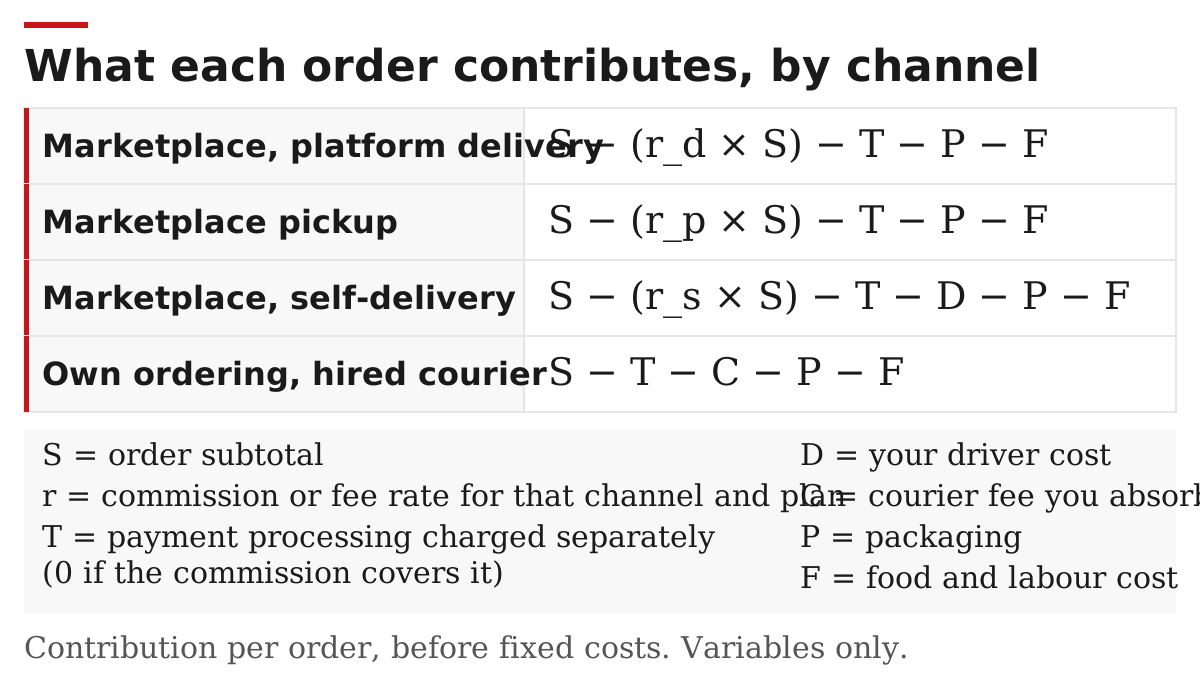
| Channel | What you keep per order (variables) | What the variables mean |
|---|---|---|
| Marketplace, platform delivery | S − (r_d × S) − T − P − F | S = order subtotal; r_d = delivery commission rate for your plan |
| Marketplace pickup | S − (r_p × S) − T − P − F | r_p = pickup rate; on DoorDash’s and Uber Eats’ standard plans it is lower than r_d, but some cities list equal rates |
| Marketplace, self-delivery | S − (r_s × S) − T − D − P − F | r_s = self-delivery fee rate; D = your driver cost for that order |
| Own ordering, hired courier | S − T − C − P − F | C = any part of the courier fee you absorb instead of the customer |
In every row, T is payment processing charged separately on that order, which can combine a percentage with a fixed amount per order; set it to zero where the commission already covers processing, as DoorDash states for its Marketplace. P is packaging and F is the food and labour cost of the dishes. For food, F comes from recipe costing, a menu planning task; for drinks it comes from recipe specs and current bottle costs, which regular counts with a bar inventory app or scale keep up to date. If you set higher menu prices on the app, which DoorDash allows for delivery orders, S rises on that channel only. Your own website orders carry no commission on DoorDash Online Ordering or Uber Webshop, but you still pay processing; DoorDash states that customers pay the delivery fee on its direct orders. Check what each contract calculates its percentage on before you fill in r, and note any city-specific terms. Packaging cost P belongs in every takeaway row, so record it per order rather than per case bought.
Takeaway: Fill in the formula for each channel before you compare plans; the channel with the lowest commission is not always the one where you keep the most.
Delivery, takeout and pickup: what changes for the restaurant?
Takeout means food made to eat elsewhere; delivery and pickup describe how it reaches the customer. For the restaurant, delivery adds a courier handover and a delivery commission, while pickup keeps the customer coming to your door and, on DoorDash’s and Uber Eats’ standard plans, carries a lower commission.
| Question | Delivery via an app | Pickup (app or own site) |
|---|---|---|
| Who covers the last mile? | Platform courier or your driver | The customer |
| Commission charged on marketplace orders | Delivery rate for your plan | Lower pickup rate on DoorDash’s and Uber Eats’ standard plans |
| Menu price rule | You can price delivery orders differently on DoorDash | DoorDash and Uber Eats tie the lower pickup rate to in-store prices |
| Who sees the customer at handover? | The courier | Your staff |
| Packaging | Must survive the courier’s trip | Must survive the customer’s trip home |
| Time to measure | Food ready to courier handover | Food ready to customer collection |
| Fees seen by the customer | Delivery, service and other platform fees | No delivery fee for delivery that does not happen |
The menu-price rule matters. DoorDash says restaurants can set different prices for delivery orders and many do; but its lower pickup rate requires DoorDash pickup prices to match in-store prices, and Uber Eats conditions its lower Pickup Fee on proof of in-store pricing. If you raise prices on the app, plan separate delivery and pickup prices and keep a record of your in-store menu. Writing every app entry to the same pattern as your printed menu, as the cocktail menu design guide does for drinks, makes two price lists easier to keep in step; more is under menu planning.
Common mistake: Raising app prices across the board and losing the lower pickup rate. Check the pickup pricing condition in your plan before changing in-app prices.
Takeaway: Push pickup where customers live close by and your counter has space; use delivery for reach, and price it so the commission is covered.
How to test a channel before committing
Run one change at a time for two to three weeks and record the same figures for every order, so the per-order formula is filled with your numbers instead of guesses. DoorDash suggests a similar trial window before switching plans. Both DoorDash and Uber Eats offer introductory periods on some plans, so judge the channel on the weeks after the introductory rate ends.
| Record for each order | Where it comes from | Fills |
|---|---|---|
| Channel and plan (app, plan, delivery or pickup, own site) | Order screen | Which row of the formula |
| Order subtotal | Payout statement | S |
| Commission or fee deducted | Payout statement | r × S |
| Payment processing charged separately | Payout or processor statement | T |
| Driver time or courier fee you paid | Staff rota or courier invoice | D or C |
| Packaging used, at your purchase price | Packaging invoices | P |
| Food and labour cost of the dishes | Recipe costing and rota | F |
| Promotions, refunds and cancellations | Payout statement | Deducted from the total afterwards |
| Food-ready to handover time | Kitchen record | Whether delivery slows dine-in service |
Read the conditions attached to minimum-order protections in your own agreement: both DoorDash and Uber Eats tie them to limits on cancellations and to keeping the store open on the app for most of its set hours. If delivery orders include bottled drinks, count that stock the same way as the rest of the bar; the bar inventory software guide compares counting methods, and related topics sit under beverage service.
Takeaway: Judge a channel on two or three weeks of your own payout statements, not on the plan card.
When this does not apply
- Outside the US. The plans and fee types here come from US merchant pages; Uber Eats states its plans cover the US excluding Puerto Rico.
- Cities with local fee rules. Uber Eats says marketplace fees “may differ depending on applicable regulations in your market” and lists lower Lite fees in cities including New York City, Seattle, San Francisco and Los Angeles. DoorDash’s customer fee update is not rolling out in several markets, including California, Chicago and New York City. Check the current rules with your local authority; this article gives no legal view on them.
- Larger groups. DoorDash’s published plans apply to restaurants with 75 or fewer US locations; larger groups fall outside them.
- Alcohol. This guide does not cover alcohol delivery permits or compliance; check your state and local authority before adding drinks to a delivery menu. For drinks lists in general, see the cocktail menu design guide.
- Rates and features change. Every platform fact here was read on 7 October 2026. Re-read the pricing pages before signing up.
Takeaway: Use this guide to understand the structure, then confirm the current terms for your city and plan.
How we checked this
We compiled this explainer on 7 October 2026 from the public US merchant pages of DoorDash (Marketplace pricing, Online Ordering and Drive On-Demand), DoorDash’s customer fee help article, Uber Eats’ merchant pricing page and Grubhub’s merchant home page, listed under the sources below. These are each company’s own descriptions of its service. We did not test any platform, we do not rank them, and we left fee percentages out on purpose because they change and differ by city. The formula is our own way of organising the published fee types. More articles on restaurant operations are listed on the blog, and About explains who runs this independent site.
Takeaway: Treat platform facts here as dated descriptions and the formula as a worksheet you fill in yourself.
Related reading
- Cocktail menu design: structure, layout and examples — Write menu entries to one pattern so app and in-store menus stay consistent.
- Bar inventory software, apps and scales — Choose how to count drinks stock, including bottles sold through delivery.